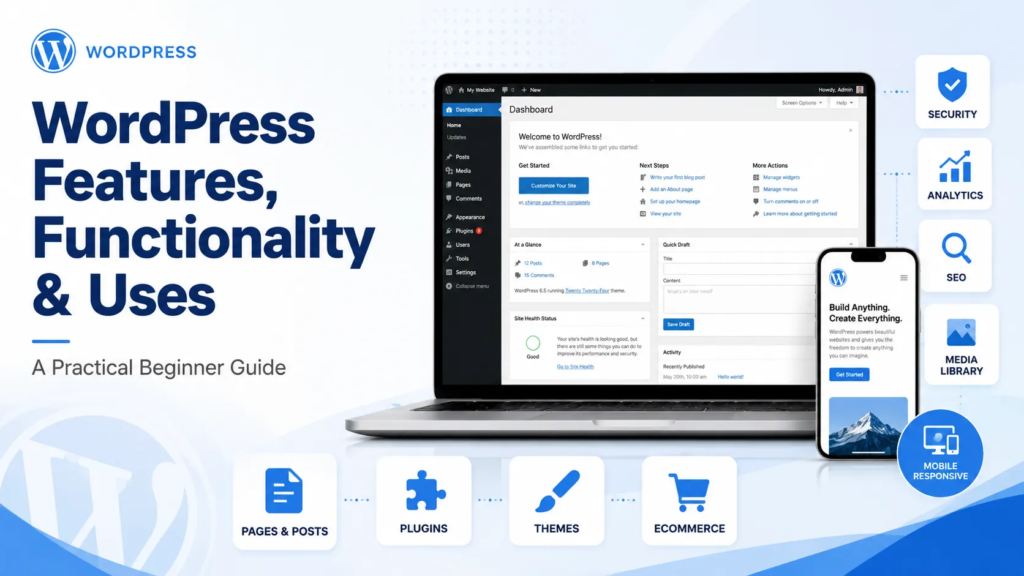
WordPress Explained: Features, Functionality and Practical Uses
WordPress is one of the most widely used content management systems for building and managing websites.
It allows users to create pages, publish articles, upload images, manage products and update website content without editing every part of the website through code.
WordPress can be used for simple blogs, professional business websites, ecommerce stores, portfolios, online courses and many other types of digital platforms.
What Is WordPress?
WordPress is a content management system, commonly called a CMS.
A CMS provides an admin dashboard where website owners can manage content and website functions.
Through the WordPress dashboard, users can:
- Create and edit pages
- Publish blog articles
- Upload images and videos
- Manage website menus
- Install themes
- Add plugins
- Manage users
- Review comments
- Configure website settings
- Manage products and orders
This makes website management easier for users who may not have advanced coding knowledge.
How WordPress Works
A WordPress website mainly works through four components:
- WordPress core
- Themes
- Plugins
- Website content
WordPress Core
WordPress core is the main software that operates the website.
It manages important functions such as:
- User accounts
- Page and post publishing
- Media management
- Website settings
- Comments
- Themes and plugins
- Basic security permissions
WordPress core should be updated regularly for security, compatibility and performance.
Themes
A WordPress theme controls the website’s visual appearance.
It manages elements such as:
- Page layouts
- Fonts
- Colours
- Headers
- Footers
- Blog design
- Mobile responsiveness
Some themes provide simple layouts, while others include advanced customization features.
A professional website should use a lightweight and properly maintained theme rather than selecting a theme only because it has many visual effects.
Plugins
Plugins add new functionality to a WordPress website.
A plugin works like an extension or additional tool.
Plugins can be used for:
- Contact forms
- SEO
- Website security
- Ecommerce
- Backups
- Caching
- Analytics
- Appointment booking
- Memberships
- Social media feeds
- Online courses
For example, WooCommerce converts a WordPress website into an ecommerce store.
However, installing too many unnecessary plugins can make a website slow or create compatibility and security issues.
Pages and Posts
WordPress provides two main content formats: pages and posts.
Pages
Pages are normally used for permanent website content.
Examples include:
- Home
- About
- Services
- Contact
- Privacy Policy
- Product or landing pages
Pages do not usually depend on publication dates.
Posts
Posts are mainly used for blogs, news, updates and educational content.
Posts can be organized through:
- Categories
- Tags
- Authors
- Publication dates
- Featured images
For example, a digital agency may categorize articles under Web Development, SEO, Social Media and AI Automation.
WordPress Media Library
The Media Library stores website images, videos, documents and other uploaded files.
Users can:
- Upload media
- Add image titles
- Write ALT text
- Edit captions
- Reuse existing images
- Organize visual content
Images should be compressed before uploading because large files can reduce website speed.
Descriptive filenames and ALT text also support accessibility and image SEO.
WordPress User Roles
WordPress allows multiple users to access the website with different permission levels.
Common user roles include:
Administrator
Has complete control over the website, including users, themes, plugins and settings.
Editor
Can manage and publish content created by different users.
Author
Can publish and manage their own posts.
Contributor
Can write content but cannot publish it without approval.
Subscriber
Has limited account access, usually for memberships or restricted content.
Businesses should give users only the permissions required for their responsibilities.
Menu and Navigation Management
WordPress allows website owners to create and manage navigation menus.
Menus can include:
- Website pages
- Blog categories
- Custom links
- Product categories
- Dropdown items
Clear navigation helps visitors find information quickly.
A business website should avoid overcrowded menus and use simple labels such as Services, About, Blog and Contact.
Website Customization
WordPress websites can be customized using:
- Theme settings
- Block Editor
- Page builders
- Custom CSS
- Custom code
- Templates
- Widgets
Popular page builders allow users to design layouts through drag-and-drop controls.
However, customization should remain consistent. Too many fonts, colours, animations and layout styles can make the website look unprofessional.
WordPress Block Editor
The WordPress Block Editor allows content to be created through individual blocks.
Common blocks include:
- Paragraphs
- Headings
- Images
- Videos
- Buttons
- Columns
- Lists
- Tables
- Quotes
- Galleries
Each block can be moved, edited and customized separately.
This makes article and page creation more flexible than editing one large content box.
WordPress Ecommerce Functionality
WordPress can be converted into an ecommerce website through WooCommerce or another suitable ecommerce plugin.
An ecommerce website can include:
- Product pages
- Product categories
- Shopping cart
- Checkout
- Customer accounts
- Coupons
- Inventory management
- Payment gateway integration
- Shipping options
- Order management
- Tax settings
WooCommerce is suitable for physical products, digital products, subscriptions and some service-based businesses.
Before launching an ecommerce store, payment, shipping, mobile checkout and email notifications should be tested carefully.
WordPress SEO Functionality
WordPress provides a useful foundation for SEO, but it does not automatically guarantee rankings.
SEO functionality can include:
- SEO titles
- Meta descriptions
- XML sitemaps
- Canonical URLs
- Robots settings
- Schema markup
- Image ALT text
- Internal linking
- Breadcrumbs
SEO plugins can simplify these settings, but good rankings still depend on website quality, content, competition, technical performance and relevance.
Contact Forms and Lead Generation
WordPress can support lead generation through:
- Contact forms
- Quote-request forms
- WhatsApp buttons
- Call buttons
- Newsletter forms
- Appointment booking
- Downloadable resources
- Landing pages
Forms should be short, mobile-friendly and connected to a reliable email-delivery system.
Every form should also be tested regularly to ensure enquiries are being received.
WordPress Blogging
WordPress originally became popular as a blogging platform and still provides strong content-publishing functionality.
Businesses can use blogs to:
- Answer customer questions
- Share tutorials
- Explain products or services
- Build search visibility
- Establish expertise
- Attract website traffic
- Support sales pages
Blog content should be organized into a limited number of clear categories.
Membership and Online Course Websites
WordPress can also be used for:
- Online courses
- Student dashboards
- Paid memberships
- Protected lessons
- Quizzes
- Certificates
- Subscription content
This functionality usually requires a learning-management or membership plugin.
The correct system depends on the number of users, payment requirements and course complexity.
Booking and Appointment Websites
Service businesses can use WordPress for online booking.
Examples include:
- Clinics
- Consultants
- Coaches
- Salons
- Trainers
- Tutors
- Repair services
Booking functionality can include:
- Available time slots
- Service selection
- Staff selection
- Confirmation emails
- Online payments
- Reminder notifications
Multilingual Websites
WordPress can support websites in multiple languages.
This is useful for companies targeting:
- GCC markets
- European countries
- International customers
- Local multilingual audiences
Multilingual websites require proper URL structure, translated metadata and language-specific content.
Only translating text without considering local customer behaviour may not produce strong results.
WordPress Analytics and Tracking
WordPress can be connected with analytics and marketing tools such as:
- Google Analytics
- Google Search Console
- Google Tag Manager
- Microsoft Clarity
- Meta Pixel
- Advertising conversion tracking
These tools help businesses understand:
- Website traffic
- Visitor behaviour
- Traffic sources
- Popular pages
- Form submissions
- Product purchases
- Conversion problems
Tracking should be configured accurately rather than simply installing a plugin and assuming everything is measured.
WordPress Security
WordPress security depends on proper management.
Important security practices include:
- Strong passwords
- Limited admin access
- Regular updates
- Security monitoring
- Website backups
- SSL certificate
- Malware scanning
- Login protection
- Trusted themes and plugins
Unused themes, inactive plugins and outdated software should be removed.
WordPress Backups
A backup protects the website if files are damaged, deleted or attacked.
A complete backup should include:
- Website files
- Database
- Images
- Themes
- Plugins
- Settings
Backups should be stored in a separate location rather than only on the same server.
WordPress Speed Optimization
Website performance can be improved through:
- Image compression
- Caching
- Code optimization
- Reliable hosting
- Lightweight themes
- Limited plugins
- Content Delivery Network
- Database cleanup
- Lazy loading
Speed optimization should be tested carefully because aggressive settings can break layouts, forms or ecommerce functions.
Common Uses of WordPress
WordPress can be used for:
- Corporate websites
- Small business websites
- Personal blogs
- News websites
- Ecommerce stores
- Portfolios
- Agency websites
- Restaurant websites
- Educational platforms
- Online courses
- Membership websites
- Real estate websites
- Appointment websites
- Landing pages
- Non-profit websites
Its flexibility is one of the main reasons businesses and developers continue to use it.
Advantages of WordPress
The main advantages include:
- Easy content management
- Flexible design
- Large plugin ecosystem
- Ecommerce capability
- SEO-friendly structure
- Multiple user roles
- Blogging tools
- Scalable functionality
- Large developer community
- Business ownership and control
Limitations of WordPress
WordPress also has limitations.
Possible challenges include:
- Plugin conflicts
- Security risks from outdated software
- Performance issues from heavy themes
- Regular maintenance requirements
- Compatibility problems
- Poor-quality plugins
- Complex customization requirements
WordPress is powerful, but it still requires proper planning, development and maintenance.
Final Thoughts
WordPress is much more than a blogging tool.
It is a flexible content-management platform that can support business websites, ecommerce stores, educational platforms, booking systems, portfolios and lead-generation websites.
Its real value comes from combining the right theme, carefully selected plugins, strong website structure, reliable hosting and regular maintenance.
A successful WordPress website should not only look professional. It should also be fast, secure, mobile-friendly, easy to manage and aligned with the website’s business purpose.
Need Help with WordPress?
DMRS Digital develops and improves WordPress websites for businesses.
Our services include:
- WordPress website development
- Ecommerce development
- Plugin configuration
- Technical SEO
- Speed optimization
- Security setup
- Website maintenance
- Conversion improvements
Discuss your WordPress project with DMRS Digital.
Website: www.dmrsdigital.com